
Part II: Time Management and Equipment Checkout Software

Welcome to part two of our special focus on time management. It explores smart ways to improve productivity while de-stressing your day when coordinating equipment loans. This is made possible by the automations and time-saving tools built into equipment checkout software.
In this installment we’ll be looking at how you can take complete control of your schedule. You will never get caught out needing to prepare multiple checkouts simultaneously, or have students arrive at an unstaffed desk. And if you manage a team, you’ll have all you need to efficiently manage staff rotas. If it all sounds like it can run as clockwork, then that’s because it’s exactly what Connect2 is able to achieve. Here’s how….
- Queue Management
- Checkout Desk Footfall
- Calendar Management
1. QUEUE MANAGEMENT – this limits the number of equipment reservations that can start or end during a certain time period in order to control footfall at the checkout desk. You decide the length of the time period (e.g. 15 minutes) and how many checkouts/check-ins that can be reasonably handled in that time. In doing so, you would consider the typical size of your equipment orders and how long they take, along with the number of staff usually available to help at the desk. Then simply input the settings under the Queue Management section of Edit Site. See how well this works in practice then you can review and adjust as needed.
Users will know at what times the desk is already at full capacity when making their booking. They will see this clearly marked in the calendar in Connect2 when choosing a time so can easily find a free slot. This way there’s clear communication for all involved.
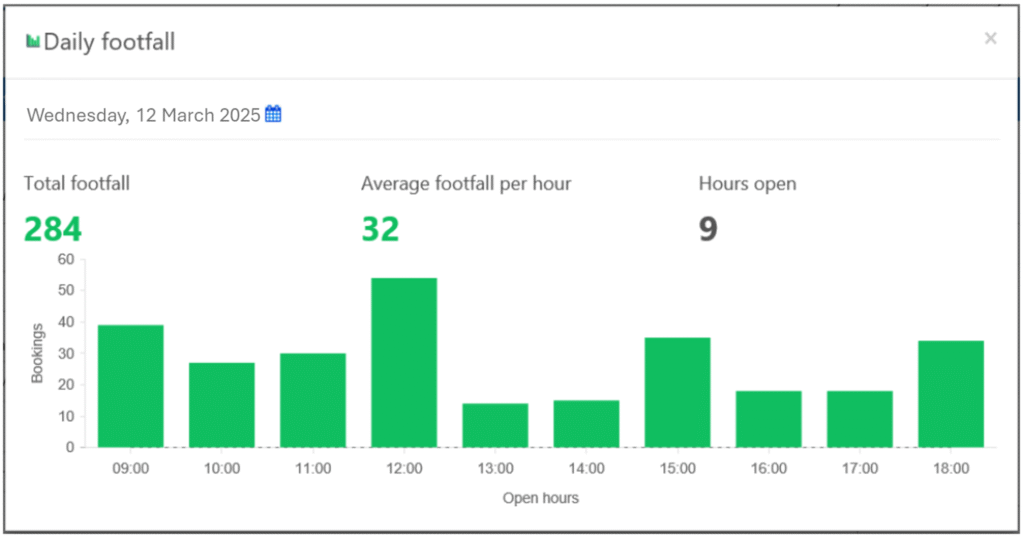
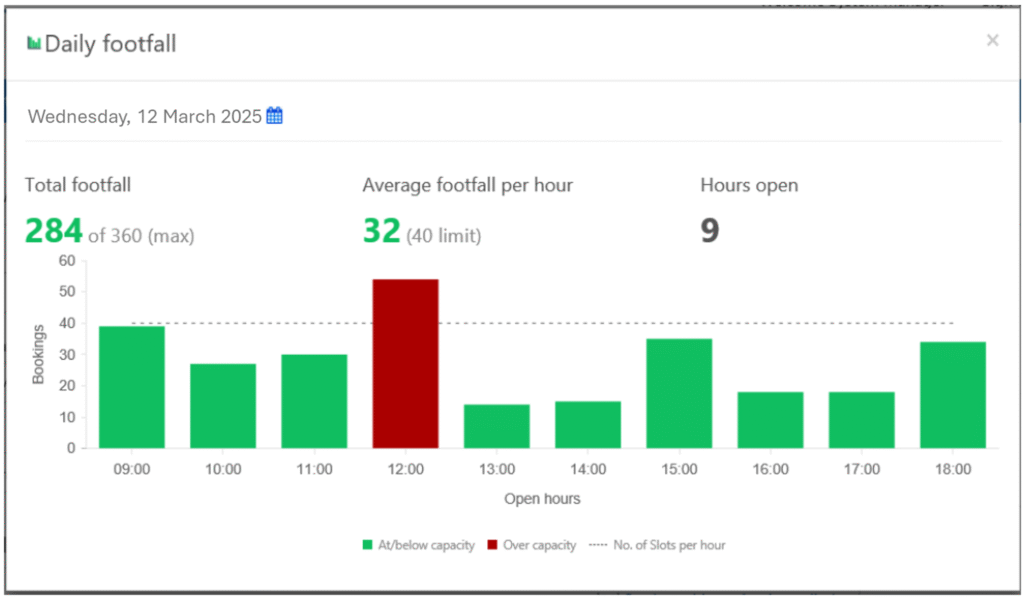
2. CHECKOUT DESK DAILY FOOTFALL CHART – this displays historic and future data to make clear checkout desk footfall each hour of opening. When a Queue Management maximum capacity has been applied, the impact of the restriction is visually applied to the chart. So you can assess the impact of using this control and how far it will restrict usual reservation and checkout patterns.
Simply click through from the Queue Management feature to see the chart for the day ahead, with the option to choose past and future dates to display as needed. Each time you will see checkout desk footfall volume hour by hour, representing all scheduled or fulfilled checkout and check-in activity. Average footfall per hour and Hours open are also provided to help give context for the data displayed.
Here’s an example of reviewing daily footfall as experienced in a previous semester:
And an example of footfall on the same day with the impact of a proposed restriction of a maximum 40 checkouts and check-ins per hour:
3. CALENDAR MANAGEMENT – Underpinning the whole stress-free environment supported by Connect2 is your use of a site calendar. This will determine when resources are permitted to be checked out and returned, with the store made clearly available during regular, well-advertised hours only. Holidays are also clearly scheduled and communicated. This avoids dealing with any reservation requests or impromptu activity that falls outside a workable schedule.
In summary, these tools enable you to comfortably manage access to equipment checkout services, ensuring staff are able to cope with checkout/in volumes throughout the day. At the same time, students will find that checkouts are always available as scheduled with prompt service provided as standard.
Final word for a stress-free schedule
Connect2 enables you to efficiently manage a great service while keeping your stress levels in check. A final tip is to ensure you uphold a policy of advance bookings only. This way students will always arrive only at the appointed times when the store is open and staff are available to issue equipment or accept its return. With the added help of the Connect2 checkout/in dashboard for the day and week ahead, you will always be in control of your schedule and making the most of your day.