
Laptop Loans: Guide to Student Loaner Pool Services

Laptop loans – A key student service
Laptop loans are run by universities to allow each student access to a loaner computer without the expense of buying one. Loaner laptops can be rented out on a long or short-term basis depending on the needs of the students and the resources available to the department or school. They ensure both students and staff have well maintained, up-to-date machines always at their disposal. Whether short on cash or if their usual PC has let them down, laptop loans provide a vital service so work can always continue.
Here we look at what helps for running successful laptop loans for students and staff, including ideas and specifications on the most suitable models of machines to include. We also consider what software support your laptop loans program needs for a well-oiled operation.
| You’re reading the latest media kit guide from Connect2 – supporting great equipment loaner services in Higher Education. Check out more on the Connect2 blog! |
Laptop rental near me: What machines make the best loan computers?
Laptop loan for students provides a passport to academic attainment without adding to their financial stresses. When students know how to get a free laptop they have greater confidence to begin or continue their studies, safe in the knowledge they can work and collaborate to meet the demands of their courses. This is why it is important to publicize your laptop loaner program to current and prospective students – and their parents. It will also help institutions to gauge demand and ensure that there is an adequate supply of machines for those with the greatest need.
Laptop rental schemes can only be truly effective if the laptops in question meet the demands of the users’ studies. Laptop loaner pools should include a range of machines to support a broad scope of use cases. Some areas of study may require more memory to store larger files, while others may require sophisticated graphics cards or high-resolution displays. What’s more, laptops should also be able to withstand the rigors of daily use, travel, and changing hands multiple times.
With that in mind, let’s take a look at some of the best models to use as loaner laptops.
Best laptops for general use
Most university departments, faculties, and libraries will be looking for a good all-rounder that can withstand the rigors of general use for most students, as well as supporting faculty members or support staff when an extra laptop is needed. These laptops should have a good allocation of storage space, a solid build, strong battery life, and a CPU that can work as fast as your most diligent student. A good quality webcam for video conferencing is also desirable.
With this in mind, some of our favorite all-rounders include:
| Model | Key Features | Price |
| Dell XPS 13 | Choice of 12th Gen Intel Core™ i5-1230U or 12th Gen Intel® Core™ i7-1250U CPU 13.4” anti-glare screen with up to 4K resolution Integrated Intel Iris Xe GPU Up to 1TB Solid State Drive (SSD) Up to 32GB DDR5 RAM Approx. 8-hour battery life 720p webcam 2.91lbs / 1.23kg | From $799 USD / £799 GBP |
| Acer Aspire 5 | Intel Core i5-1135G7 CPU 15.6”-17.3” 1080p screen Integrated Intel Iris Xe GPU 256GB SSD 8GB DDR4 RAM Approx. 6.5-hour battery life 720p webcam 3.96lbs / 1.8kg | From approx. $599 USD /£449 GBP |
| Asus Zenbook 14 OLED | Choice of Intel Core i5-1240P (1.7GHz)/Intel Core i7-1260P Processor (2.1 GHz) CPU 14” 2.8K OLED touchscreen Integrated Intel Iris Xe GPU 512GB-1TB SSD 16GB LPDDR5 RAM Approx. 15-hour battery life 1080p FHD webcam 3.06 lbs / 1.39 kg | From approx. $749 USD / £699 GBP |
| Dell Inspiron 14 2-in-1 | 12th Gen Intel Core i5-1235U CPU Integrated Intel Iris Xe GPU 14” FHD touchscreen 512GB SSD 8GB RAM Approx. 8-hour battery life 1080p webcam 3.46 lbs / 1.57kg | From approx. $849.99 USD / £699 GBP Plus an additional $40/£40 for stylus |
| Macbook Air 13” M2 Chip | M2 Chip with 16 core neural engine (8-core CPU, 8-core GPU) 13.6” Liquid retina display 8GB Unified memory Up to 512 GB SSD Approx 18-hour battery life 1080p FaceTime camera 2.75 lbs / 1.25 kg | From $999 / £1,149 GBP |
Our top pick: Dell XPS 13
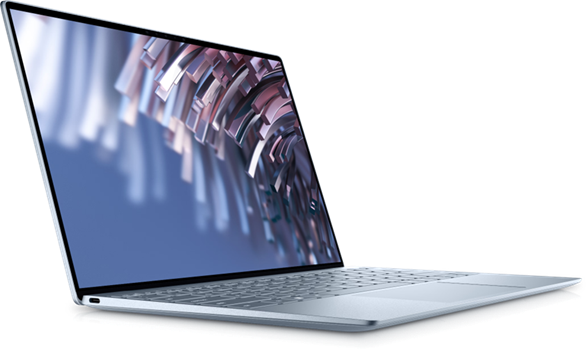
Boasting ample storage, a great-looking screen, a sturdy chassis, and a budget-friendly price tag it’s hard to recommend a better all-rounder for academic use than this offering from Dell. Find out more.
Best budget laptops
If your budget is limited, or you want to ensure a broader pool of loaner laptops, with more machines at lower prices, we have some suggestions. These models combine affordability with capability and can handle most student workloads with aplomb.
| Model | Key Features | Price |
| Acer Aspire 3 | Intel Core i3-1115G4 Dual-core 3 CPU Intel UHD Graphics shared memory 15.6” 1080p FHD screen 128GB SSD 8GB of LPDDR5 RAM Approx. 8-hour battery life 720p webcam 3.75 lbs/1.7kg | From approx. $399 USD /£349 GBP |
| Lenovo IdeaPad Flex 5i | 11th Generation Intel Core i3-1115G4 CPU Integrated Intel Iris Xe GPU 14-15” 1080p FHD touchscreen 512GB SSD 8GB DDR4 RAM Approx. 13-hour battery life 1080p webcam 3.5lbs/1.59kg Functions seamlessly as a laptop or tablet | From approx. $619 USD / £549 GBP |
| Acer Swift 3 OLED | Choice of Intel Core i5-12500H(2.5 GHz) / i7-12700H (2.3 GHz) CPU Iris Xe GPU 14” OLED screen with HDR 512GB SSD 16 GB LPDDR5 RAM Approx. 9-hour battery life 1080p webcam 3.09 lbs/1.4kg Instant wake | From approx. $649 USD /£499 GBP |
Our top pick: Acer Swift 3 OLED
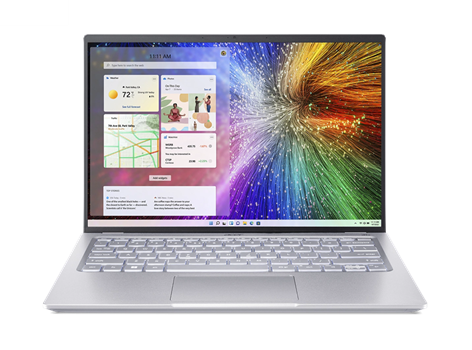
Although it may not be the cheapest entry in this list, the Acer Swift 3 OLED’s HDR screen, spacious SSD, robust processing power and 1080p webcam with temporal noise reduction represent excellent value for money. Find out more.
Best laptops for graphic design and video
Students undertaking courses in graphic design, game art, animation, video production, and other visual arts courses will need a laptop with particular specifications. These include a powerful processor, plenty of storage space and RAM, and an excellent display with outstanding color accuracy. Users may also want a good array of ports for additional memory storage (via SD card or external storage drive) or to connect accessories such as drawing tablets or digital cameras.
Some of our recommendations include:
| Model | Key Features | Price |
| Dell XPS 17 | Choice of 13th Gen Intel Core i7-13700H / 13th Gen Intel Core i9-13900H CPU Choice of Nvidia GeForce RTX 4060/4070/4080 GPUs Up to 4TB SSD Up to 64 GB DDR5 RAM 17” screen with up to 4K display Approx. 14-hour battery life 1080p infrared webcam Starting weight 5.10 lbs/2.31 kg 4x USB C ports, 1 SD-card slot, 1 wedge-shaped lock slot | From approx. $2,699 USD / £2,999 GBP |
| Lenovo ThinkPad X1 Yoga Gen 8 | 13th Generation Intel Core i7-1370P CPU Integrated Intel Iris Xe Graphics Up to 512GB SSD 16 GB LPDDR5 RAM 16:10 (golden ratio) 1080p OLED touch screen Approx. 14-hour battery life FHD infrared webcam 3.04lbs/1.38kg 2in1 works as either a laptop or tablet Intel® Unison facilitates seamless connection with Android and iOS phones 2 x USB-C ports, 2 x USB-A 3.2 and optional nano SIM slot Users will need an external SD card reader for this model | From approx. $1,456 USD/ £1,890 GBP |
| MacBook Pro | M3 Chip with 8-14 coreCPU (with 4 efficiency cores) 10-core GPU with hardware-accelerated ray tracing 14” XDR Liquid retina display 8-36GB Unified memory Up to 1TB SSD 1080p FaceTime camera with advanced image signal processor 2x USB C ports SDXC card slot Approx 22-hour battery life 2.75 lbs / 1.25 kg | From approx. $1,499 USD/ £1,699 GBP |
| Gigabyte Aero 17 | 12th Gen Intel Core i9-12900 HK Nvidia GeForce RTX 3080 Max-Q GPU Up to 4x 1TB SSDs Up to 65GB DDR5 RAM Pantone-certified 17” 4K OLED screen 1080p infrared camera Approx. 8-hour battery life Starting weight 5.1lbs/2.31 kg 2x USB-C ports, 2x USB-A 3.2 ports, mini DP 1.4 slot, UHS-II SD Card Reader World’s First Microsoft Azure AI Notebook | From approx. $1,599 USD / £1,170 GBP |
Our top pick: Gigabyte Aero 17
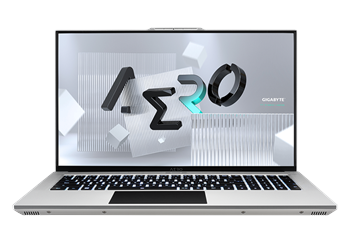
With an impressive GPU, ample storage space and a stunning Pantone-certified 4K screen and great external device connectivity, this is an excellent choice for graphic design and video production. Find out more.
Best laptops for game/software development
Students learning to make their own video games or other software applications benefit from laptops that combine robust processing power with a capable GPU. Plenty of RAM is also a key requirement as a laptop for game development must, by necessity, also be a gaming laptop. Finally, a roomy SSD is necessary to accommodate the large file sizes for games and assets.
With this in mind, here are some of our top picks:
| Model | Key Features | Price |
| ASUS Zenbook Pro 16X OLED | Choice of Intel Core i9-12900H, i9-13900 or i9-13905H CPU Choice of Nvidia GeForce RTX 3060/4070 or 4080 GPU Up to 2TB SSD Up to 64 GB LPDDR5 RAM 3.2-4K 16” OLED touchscreen FHD infrared webcam 1x M.2 2280 PCIe 4.0×4 expansion slot 5.29 lbs/2.40 kg Ergonomic design | From approx. $2,699 USD/ £2,999 GBP |
| Lenovo ThinkBook 14S Yoga | 11th Gen Intel Core i5 – i7 CPU Intel Iris Xe GPU Up to 1TB SSD 16GB DDR4 RAM 14.0” 1080p touchscreen 1080p webcam Approx 12-hour battery life 3.3lbs/1.5kg Garaged stylus One of few 2 in 1s fit for game design | From approx. $1,420 USD / £1,219 GBP |
| Asus TUF Gaming F15 | Intel® Core™ i5-10300H Processor 2.5 GHZ CPU Up to NVIDIA GeForce RTX 3070 GPU 512GB SSD Up to 16GB DDR4 RAM Up to 15.6” 4K 165 Hz anti-glare screen 720p webcam Approx. 8-hour battery life 4.85lbs/2.2kg Relatively budget-friendly gaming laptop | From approx. $899 USD/ £899 GBP |
| Dell Precision 5470 | 12th-generation Intel Core i7-12700H/12800H CPU NVIDIA RTX A1000 GPU 4GB graphics Up to 4 TB SSD 16-32GB DDR4 RAM 14” FHD 500 nits WLED screen 720p webcam Approx. 15 hours battery life Starting Weight: 3.26 lb/1.48 kg | From approx. $1,929 USD / £1,695 GBP |
Our top pick: Dell Precision 5470
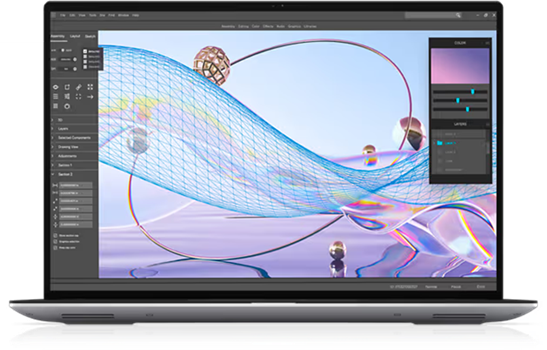
While the ASUS Zenbook Pro 16X OLED is the more muscular choice, we feel Dell’s offering combines highly capable CPU and GPU with a great-looking display at a manageable price point. Find out more.
How Connect2 equipment checkout software can help
Now that you’ve chosen the best loaner laptops for your pool, you’ll need to consider how these valuable assets are managed, checked in, and checked out.
That’s where we come in.
Connect 2 can assist in every facet of managing your laptop loans program, from facilitating online reservations to making inventory management effortless. Come and see why Connect2 is the Number One choice for Higher Ed institutions. Schedule your free demo today!